Showing posts with label ipad. Show all posts

Thursday, July 17, 2014

Too Much Background Noise when Recording Lectures with Smart Phone or Table Built-in Microphone? Check Out the Ampridge MightMic


Mobile devices are convenient tools that students use to record classes and lectures, reporters use to record news conferences, and business people use to record meetings. Some use note taking apps like Notability, Remarks, or Livescribe+ to augment their notes with audio recordings. The benefits of recording the audio can be minimized by poor quality recordings from built-in microphones.

Built-in microphones tend to do a poor job of isolating sounds which results in background noise that makes the desired sounds difficult to hear, especially for people with hearing impairments.

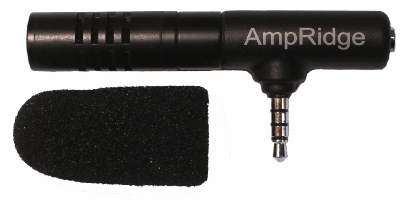
The AmpRidge MightyMic microphone plugs directly into the headphone jack of any smartphone, tablet, or computer that supports microphone input. It proves an alternative audio output jack so users can still plug in headphones while the microphone is plugged in. Its compact size makes it easy to use in class and makes in relatively discrete. The MightyMic microphone works well with an iPhone and is only slightly longer wider than the width of the phone. The microphone  even worked fine with my bulky iPhone case. Once plugged in you can angle the microphone towards the front of the room to capture the most important sounds. In my testing, the MightyMic microphone was on par with the built-in iPhone microphone for close range recording, but worked considerably better than the built-in microphone in a classroom or outdoor long range environment. The MightyMic microphone reduced background noise resulting in better sounding audio playback. If you frequently record classes, lectures, or meetings and are less than satisfied with your device's built-in microphone, the MightyMic mic is a good option to give your sound a boost. If you're looking for a big improvement in sound quality quality you may have to look towards more expensive options.

The Ampridge MightyMic retails for $70 on AmpRidge.com. Also included is a protective carrying pouch and foam protective cover.


Product was provide complimentary to reviewer for review

Sunday, April 13, 2014

Learning Ally Audio Update Includes Background Audio Support


Learning Ally, a provider of audio books for the blind and dyslexic, recently updated their iOS app. The free apps allows Learning Ally members to listen to their audio books while on the go. The new update brings a valuable  new feature to the app. Now, the app allows users to listen to their audio books while using other apps at the same time, a feature commonly called background audio. The update provides a more consistent experience for users who have come to expect background audio support in all apps. With the update users can listen to an audio book while looking up information on the internet, reading a note page, or even responding to an occasional text message. Along with background audio support comes the ability to control playback using control center or a headphones with a remote. The update is available for free and is compatible with iPhone, iPad, and iPod Touch. To take advantage of the app users must be members of Learning Ally. To learn more about Learning Ally click here.

Saturday, March 15, 2014

Voice Dream Reader Updated to Version 3.0: Read PDFs in Original Layout and More


Voice Dream Reader is an app for iPhone, iPad, and iPod Touch that supports people who prefer reading in different ways. Voice Dream can read documents from a number of sources with multiple high quality text-to-speech voices. Users can import PDFs, Word documents, text files, webpages, and even Bookshare books into the app. Once the text is loaded into the app you can listen to it using text-to-speech, highlight the text, search for a specific words or phrases, and get definitions for unknown words. Among many other uses, Voice Dream Reader is a terrific Bookshare book reader for students. Voice Dream also works very well with VoiceOver. Now, with newly released Voice Dream Reader version 3.0, new features have been added that makes the app even more useful.

Up until yesterday evening, Voice Dream only supported text. All images and formatting associated with a file were stripped away. With version 3.0 images and formatting within PDF files are retained. Now you can read a PDF in its original layout. Voice Dream still highlights each word as it is read aloud. It is easy to switch between layout view and text view depending on your preferences. Version 3.0 also includes more customization options. Users now have more control over the colors of the highlighting and spacing of the text. An improved web browser has been added that makes adding text from the web quicker and easier. New Ivona text-to-speech voices are also available for purchase in version 3.0.

With large PDF files page loading is slightly slow, but this problem only occur with very large files and does not effect text view performance.

In future updates image support maybe added for Bookshare books or other document types. I also hope iCloud sync will be added in a future update. At school I read my books on my iPhone and make new annotations, but when I get home and start reading on my iPad the annotations are stuck on the iPhone and I must search for the page that I left off on. iCloud sync would make this process much more seamless.

Voice Dream Reader is a must have app for iOS users with print disabilities or anyone who could benefit from reading with text-to-speech. Voice Dream Reader's well developed features make loading, reading, and annotating text easy. Knowing that the app has a developer that is open to feedback and actively developing new features is an added benefit. Voice Dream Reader costs $9.99 on the App Store. Click here to download the app. There is also a lite version of Voice Dream Reader that allows you to try it before you buy.

Click read more to view screenshots of Voice Dream Reader.


Sunday, February 23, 2014

Launch Center Pro: Speed Up Common Actions on iOS Devices


blue icon with rocket ship in the middleLaunch Center Pro is an app for iPhone, iPad, and iPod Touch that allows users to launch apps and simple tasks directly from the app. Instead of launching Safari, navigating to the search site, and typing in your search, for instance, Launch Center Pro lets you directly search Google or Wikipedia; Launch Center Pro also can be configured  by users to set up group email, instead of having to type in the email address of each recipient.

Launch Center Pro uses a simple interface to make it easy to simplify some of your common actions and launch them quickly. I frequently text my sister "where are you?" Instead of launching the Messages app, finding my sister's contact, and then typing the message, I created a Launch Center Pro action that sends a text to my sister saying, "where are you?" Now, when I want to text my sister, I just touch the icon for this action and a text saying "where are you?" is on its way to my sister.
,
Creating actions is easy with the built in action composer which gives users the ability to pick pre-made actions for apps they already have installed on their device. The action composer also allows users to customize the icon of the action to make it easier to find.

Launch Center Pro works with a number of apps, but support for more useful actions among third party apps is hit or miss. Some apps such as Prizmo integrate very well with the app allowing you to easily launch actions, but other apps such as Nike+ Running can be opened, but not further interacted with. It would be nice to be able to start a new run in Nike+ via Launch Center, but actions like that requires the developer to build special support for Launch Center Pro into their apps. Click here to view a list of the apps currently supporting Launch Center Pro.

I see Launch Center Pro as a great app for first time iOS users, and other individuals who struggle performing sequential functions. Launch Center Pro can make it easier for first time iOS users learn to use their devices. Instead of learning how to search Google, Wikipedia, Yelp, and Google Maps individually a simple search menu could be made with quick links to search all those services. In terms of accessibility for the blind and visually impaired, Launch Center Pro works well with VoiceOver and supports the Fleksy keyboard which is accessible.

Launch Center Pro costs $4.99 for the iPhone version and $7.99 for the iPad version. Click here to view the app for iPhone and click here to view the app for iPad. Click read more below to view screen shots of Launch Center Pro in action.


App was provided complimentary to reviewer for review 

Friday, January 31, 2014

Managing behaviour in the digital age

If you ask most teachers, especially newly trained ones, what one of the biggest challenges of teaching is, they would probably say managing student behaviour. Especially as class sizes grow and more students are bringing along potentially distracting digital devices, making sure you are keeping students on task is becoming ever more important. If this is something that concerns you, then read on.

ClassCharts could be the solution to your problem. ClassCharts is a digital management tool which can help you, your students and their parents to track and improve student behaviour across the whole school.


Using ClassCharts you can set up seating charts for every room in your school and create a profile for each student. Teachers can then use ClassCharts to monitor and reward positive behaviour as well as track negative behaviour. As the teacher builds up data across classes they can start to understand how different seating arrangements and student pairing and grouping can impact on behaviour, then generate seating charts for students that group them in ways that help them to work more efficiently and harmoniously.


So how does it work?

Well one of the first things to do is to add seating plans of your rooms. This is easy to do and you can drag the virtual desks around into whatever configuration you have in your classroom.


Then you also need to upload your students. What I really like about ClassCharts is that you can also upload a photograph of each one, and this can be really useful if you have large classes and lots of students names to remember, especially when it comes to writing reports.


You can then either manually assign seats or generate a random seating chart. During the class you can use ClassCharts acknowledge a range of positive and negative behaviours. These behaviours are all customisable so you can create your own or use the default ones.


ClassCharts uses html 5 so should run in any modern browser whether it’s a laptop, iPad or Android tablet, so the teacher can use an tablet during the class to instantly update behaviours.

Either before or during the class the teacher can also shuffle the class seating depending on a number of criteria from things like attainment targets to gender or previous behaviour.


One of the real time-savers of ClassCharts though is when it comes to report writing time. Each students’ behaviour has been tracked through their various classes and teachers can get a detailed report, including dates when different behaviours were recorded.


Both students and parents can also access live reports and monitor progress throughout the term, so students and parents know how they are doing and parents don’t have to wait until the end of term to find out what’s been going on with their child.

This helps to share responsibility and makes it much easier to get parents involved in dealing with any negative behaviour at the earliest possible date.

Although ClassCharts is free and has been designed so that a single teacher can set it up to track their own classes independently, the real power of the platform is its ability to work across the school and track student behaviour in every class. To make this easier ClassCharts also interconnects with a range of other educational management software systems, from simple tools like Edmodo to more complex ones like SIMS and PowerSchool.


What I like about ClassCharts
  • I’m really impressed by the fact that such a powerful and well designed tool is free.
  • It’s great that a system like this and the data it collects can be applied and shared across a whole school.
  • I really like that you can see the student and access a range of information about them from targets, to behaviour and even a little about their background.
  • Great to get parents involved and students monitoring their own progress.

What I’m not so sure about
  • This is quite a complex tool and creates a lot of data, so I think it’s going to take a bit of getting used to for teachers and perhaps a bit of training too.
  • It does produce a lot of data and you can easily get a bit too tied up in this and forget about the person.

Well I hope you find ClassCharts useful and give it a try.

Related links:
Nik Peachey

Thursday, January 9, 2014

Publishing 3.0 - A new model for independent educational publishing

My New Years resolution this year was to start work on a series of ebooks for iPads, e-readers and other digital devices. This has been my ambition since I published my first book Web 2.0 Tools for Teachers back in 2009, but I’ve never felt that the time, the technology or the market was at the right place.


Significant changes over the last couple of years though have led me to believe that now is the time to look at a new model of ELT publishing, at least for the realm of teacher development books.

The changes I mention above include
  • A proliferation of increasingly low cost e-reading devices and tablets.
  • The development of powerful free software and applications such as iBooks Author for the development of media rich ebooks.
  • The combination of these applications with secure and reliable marketing platforms, such as Lulu and iBookStore.
  • The development of crowd-funding platforms such as KickStarter and Indigogo.

I believe that the combination of these developments is now enabling individual teachers to write develop and launch their own products to the market on a commercially competitive basis with established publishers.

So why is this a good thing?
Well anyone who has ever approached a publisher with an idea for a book will know how difficult it can be to get it accepted. The established publishers are, by necessity, cautious about taking on new, innovative or risky projects. Producing and distributing paper-based books is a hugely expensive endeavor and in the case of teacher development books, the returns are likely to be small for both the publisher and the writer.

The changes I mention above, however, have the potential to liberate writers from the established publishing process and give them the freedom to develop their own projects and products independently.

  • The proliferation of low cost mobile devices such as e-readers, tablets and iPads provides a really useful and accessible medium on which to publish teacher development materials. Instead of having your books at home on the bookshelf you can now carry them around with you on your device so they are on hand at the moment of need.
  • These devices and the applications used to develop content for them are capable of providing a media rich experience with colour interactive images, audio, video and a range of interactive learning apps, none of which is possible in a traditional paper-based book.
  • The combination of these applications with established secure marketing platforms means that writers with the commitment to see their projects through to completion can easily market them internationally and actually get a reasonable financial return on the work they put in.
  • Crowd-funding platforms like KickStarter and Indigogo enable writers to raise the funds they need to develop good quality professional products that the market wants.

I’ve put the crowd-funding platform at the end of my list, but really it should be at the beginning, because crowd-funding doesn’t just supply the money to launch the product, it also acts as a market research tool to see if there really is a market for the product. If the people for whom the product is intended aren’t willing to invest in it to get it created, then it’s likely that there isn’t really a viable market for this product.

So this brings me back to where I started with my New Years resolution. I have launched my own crowd-funding project to try to create the first in a series of ebooks in a series that I intend to call The Digital Classroom. The first of these will focus on the use of online video as a tool for learning.

You can find out more about this project by following this link Digital Classrooms - Online Video or watching the video below.


If you think this is a product you would be interested in having them please do support it buy either buying and advance copy of the book or by sharing the link with others you think may be interested.

You can also get an idea of the kind of content the book will cover and even contribute your ideas for what the book should contain, using the crowd-sourcing questionnaire below. Just add your ideas and vote for the things you would most like included in the book. That way you can ensure that I produce the book that you need to help support and develop your teaching.


powered by tricider

You can also follow the project on Facebook by going to The Digital Classroom and clicking on 'Like'.

I hope you find the project interesting and that this post gets you started thinking about how you can produce your own book too.

Best
Nik Peachey

Wednesday, January 1, 2014

PDF Expert 5: Well Designed PDF Management App with Text-to-Speech


PDF Expert 5 is a well designed PDF management app for the iPad. The app includes many useful features that allow you to read, edit, and annotate PDF documents easily. Unlike some other feature -rich apps, PDF Expert 5 does not feel cultured. The elegant design makes the app easy to use. PDF Expert is an assistive app because of its text-to-speech integration with the added benefit of extra features.

One caveat, while the app is good for non-disabled and dyslexic users, I would not recommend the app for VoiceOver users because of some VoiceOver problems I have found. Readdle, the maker of the app, should work on fixing these VoiceOver problems so blind and visually impaired can also benefit from the app. 

PDF files can be imported from numerous cloud storage services including Google Drive, Drop Box and SkyDrive or using the "open-in" feature of many other iOS apps. You can also view other file types, but the built in text-to-speech reader is only available for PDF documents. Files can be organized into folders or dragged and dropped into different sections.

PDF Expert's text-to-speech function works with any PDF with digital text. It does not work with PDF documents that have text within images. To read a compatible PDF, turn on text-to-speech in the reading mode menu and then press play. You can start reading at the middle or end of a page by highlighting a word and pressing "read from here." Text is read with the default iOS voice that many may recognize as the voice of Siri. Unfortunately, you cannot purchase additional higher quality voices. The app also requires you to re-enable text-to-speech every time you switch PDF documents. This is inconvenient if you switch are between PDF documents quickly.

Click read more below to continue reading about PDF Expert.

Viewing a PDF document is also a breeze. PDF Expert includes a quick scrolling mode and thumb nail view to allow you to easily navigate large PDFs. You can also change the background to sepia or night for easier viewing.

Aside from the text-to-speech features PDF Expert includes a number of editing and annotation features. Annotation options include highlighting, underlining, shapes, strike-through, stamps, signatures, and text. These annotation options are intuitive to use and you can easily can the color of highlights and other annotations. If you would like to add text to a PDF document you do not need to worry about overlapping any original text because the app automatically wraps your text so it will not overlap. Unfortunately, the app will not read your text annotations back to you using the built in reader, but you can always use the built in Speak Selection feature.  

PDF Expert also includes a review mode which allows you to edit and markup existing PDF documents. To learn more about this feature see the below video.

With PDF Expert's easy to use annotation and editing features and its built in text-to-speech reader PDF Reader is an ideal app for any iPad user who wants increase productivity. PDF Expert 5 is compatible with iPads running iOS 6 or higher and is available for $9.99 in the App Store.